
Downloading And Using Templates
- Step 1 – Find the Asset you wish to use in your My Assets page
- Step 2 – Open the Asset and copy the text to your chosen destination
Step 1 – Find the Asset you wish to use in your My Assets page
- In your My Assets page, you can find all the Emails, Blogs, Lead Magnets, and other non-Social Post content that you have saved by selecting Templates from the top filter bar.
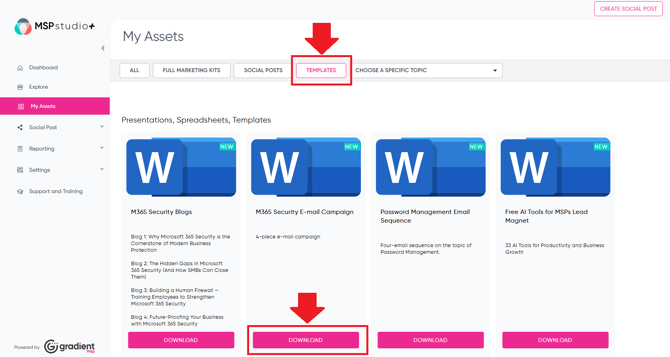
- Once you've located the Asset you wish to use, go ahead and Download it.
Step 2 – Open the Asset and copy the text to your chosen destination
- You can now open the downloaded Asset and transfer the text to your chosen destination, such as an email or blog.
- Note that for Email Sequences it is important to adjust the text to include your personal or company details as outlined in the document they come in. Different Subject Line options are listed for you to choose from.